CFMOTO RIDESYNC
- 4.5
- Rating
- 10.00K
- Installs
- Free
- Price
 Analysis by App-foxy
CFMOTO RIDESYNC is the kind of companion app that makes the most sense when you already own a compatible CFMOTO vehicle and want your phone to become part of the riding routine. After spending time with it, my view is straightforward: it is more useful as a practical ownership tool than as a spectacular standalone app. Its value comes from bringing connection, updates, and ride information into one place, rather than asking you to manage every part of the experience through separate tools.
That focus is important. This is an Auto & Vehicles app from CFMOTO Powersports, Inc., not a general motorcycle tracker or a universal dashboard replacement. The free price makes it easy to try, and the Everyone age rating keeps it accessible to a broad audience. I would recommend it most strongly to CFMOTO riders who want a more organized way to interact with their vehicle, while riders looking for advanced route planning, a community platform, or support for several brands may find a different app more suitable.
What using RIDESYNC feels like in everyday riding
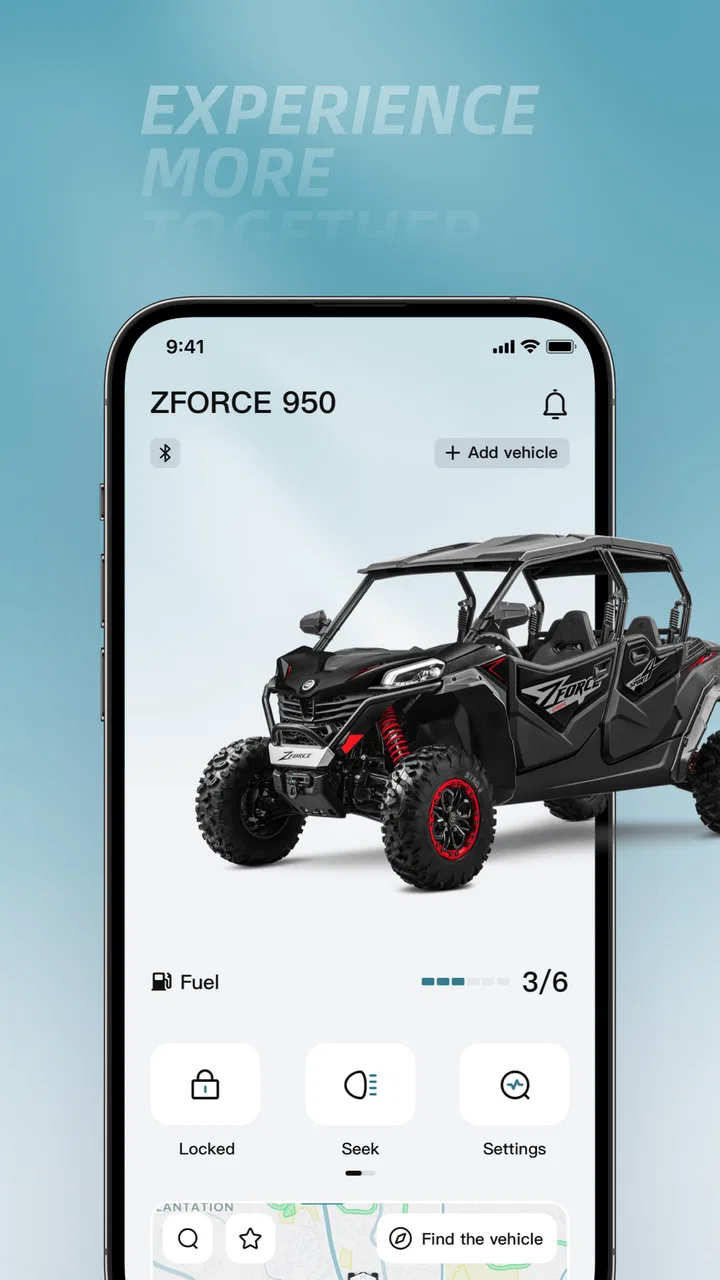
The first thing I noticed is that the app is built around the relationship between the rider, the phone, and the vehicle. That sounds simple, but it changes how you approach it. Instead of opening it casually like a social app, you tend to use it at specific moments: before leaving, after a ride, or when the vehicle needs attention. The experience is therefore less about browsing and more about checking whether everything is ready and reviewing what happened.
You May Also Like

 Blood Strike: 2.5 Anniversary
Blood Strike’s Loadouts Turn Every Drop Into a Tactical Gamble
A close look at Blood Strike’s custom loadouts: how fast access to signature weapons reshapes its battle royale rhythm, rewards preparation, and narrows the gap between fights.

 Pandora - Music & Podcasts
Pandora’s Music Is Easy to Start, but Harder to Recover
Pandora’s strength is its low-effort path from a seed to a station. Its weak spot is how much confidence it asks you to place in connection, setup, and quiet recovery.

 8 Ball Pool
 Is Built on Rivalries, Rematches, and Routine
A close look at the rivalries, rematches, shared routines, and unanswered safety questions that turn a quick pool match into a persistent mobile community.

 Samsung Music
’s Quiet Strength Is Playing What You Already Own
Its reach comes less from spectacle than from dependable access to a personal library. That simplicity is both the app’s strongest retention engine and its ceiling.

 AccuWeather: Weather Radar
AccuWeather Review: A Quick, Clear Forecast for Everyday Decisions
For everyday plans, the best forecast is the one you can understand quickly. AccuWeather makes rain timing, radar, and local conditions easy to act on, with a few trade-offs.

 Hill Climb Racing
Why Hill Climb Racing Still Turns Crashes Into One More Run
A tiny car, a bumpy hill and one more upgrade: Hill Climb Racing keeps resurfacing because its simple chaos makes every near-miss feel personal.
More From Our News Desk
View All News


In a realistic weekend scenario, I would open the app before heading out, make sure the connection is available, check the relevant vehicle information, and then leave the phone alone while riding. After returning, the useful moment is the review: looking back at ride information can help me understand how I actually used the vehicle instead of relying on memory. That makes the app particularly appealing to someone who enjoys learning from each outing, not just starting the engine and forgetting the details.
The store summary describes the core idea as connecting, updating, and analyzing your ride. In practice, those three purposes give the app a clearer identity than a long list of unrelated functions would. Connection is about establishing the link with the vehicle. Updating is about keeping the software side of the experience current. Analysis is about turning a completed ride into information that can influence the next one.
The strongest reason to keep it installed is continuity: the app can become a regular checkpoint before and after riding instead of a tool you remember only when something goes wrong. That small change in habit is where I see its greatest everyday benefit.
Connection is useful, but setup discipline matters
Like any app that depends on communication between a phone and a vehicle, RIDESYNC rewards a careful first setup. I would install it before the day of an important trip, rather than waiting until I am standing beside the vehicle with limited time. A calm setup gives me a chance to understand where the connection status appears and whether the vehicle is being recognized correctly.
That is also where one of the app’s practical limitations appears. A connected vehicle app is only as convenient as the connection at that moment. If the phone, vehicle, or app is not ready, the benefit disappears quickly. This is not a reason to avoid RIDESYNC, but it is a reason not to treat it as the only source of information during a ride. I would still prepare for a trip using the vehicle’s own controls and carry the normal essentials rather than assuming the phone will solve every problem.
For short local rides, this extra preparation may feel unnecessary. For regular owners, however, the routine becomes easier once the app is part of the pre-ride checklist. I would open it early, confirm the connection, and close anything I do not need before setting off. That approach reduces the temptation to troubleshoot while wearing riding gear or while already eager to leave.
Updates are valuable because they reduce ownership friction
The update side of the app is less exciting than ride analysis, but it may be more important over time. Vehicle software can influence how a connected system behaves, and having an app-oriented route for updates is more convenient than ignoring the software side of ownership. I like that this places maintenance near the rest of the riding information rather than separating it into an entirely different process.
My advice is to treat an update as a planned maintenance task. I would do it when the vehicle is stationary, the phone has enough battery, and I am not about to leave for a time-sensitive journey. Even when an update is designed to be convenient, interrupting the process or starting it in a poor location is avoidable friction. The app is most helpful when it supports a deliberate routine, not when it is used in a rush.
This is also an area where expectations should stay realistic. A connected app can make software maintenance easier, but it does not replace physical care, inspections, or professional service when those are needed. I would use RIDESYNC to stay organized around the digital side of the vehicle and continue treating mechanical condition as a separate responsibility.
Ride analysis can turn impressions into better decisions
The analysis element is the most interesting part for riders who like to improve their habits. After a ride, memory tends to keep the highlights and lose the small details. Reviewing ride information gives me a more grounded way to compare outings, especially when I am trying to understand whether a route felt demanding because of the terrain, the duration, my pace, or simply my own tiredness.
A useful workflow is to review the ride soon after returning, while the route and conditions are still fresh. I would note one or two observations rather than trying to analyze everything at once. For example, if a ride felt longer than expected, I could compare the recorded information with my original plan and adjust the next outing. If I am preparing for a longer trip, previous rides can help me choose a more sensible starting point instead of guessing from enthusiasm.
There is a trade-off here. Data can improve judgment, but it can also encourage over-analysis. I would not use the app to chase a perfect number or to turn every casual ride into a performance test. The most useful insight is often qualitative: recognizing patterns in how I ride and where I become less comfortable. That makes the analysis feature valuable for learning, but only if the rider remains willing to interpret it sensibly.
Where it compares well with ordinary alternatives
Without a dedicated companion app, a rider may rely on the vehicle’s built-in information, a general phone utility, handwritten notes, or a separate navigation and tracking service. Those alternatives can still be better for specific jobs. A navigation app is usually the natural choice for finding a destination, while a general fitness or route tracker may offer broader sharing and mapping tools.
RIDESYNC’s advantage is not that it should replace every one of those tools. Its advantage is that it is tied to the CFMOTO ownership experience. That gives it a more focused role: the vehicle connection, software-related tasks, and ride-oriented review belong together. I prefer that focused arrangement to forcing a general-purpose app to act like a vehicle companion.
On the other hand, the narrower focus is exactly why some riders may feel limited. If your main goal is discovering roads, sharing rides with friends, building a public riding profile, or combining several brands in one garage, a broader platform may serve you better. RIDESYNC is strongest when the vehicle itself is the center of the experience.
Three practical habits that make the app more worthwhile
Use it before important rides, not only after problems. A quick pre-ride check can reveal whether the phone and vehicle are communicating before you are far from home. This is a better use of the app than opening it only when you need urgent information.
Review rides in small batches. Looking at every detail immediately can become tiring. I would compare a few recent outings and look for a pattern, such as consistently underestimating how long a route takes or choosing rides that leave too little recovery time.
Separate digital convenience from mechanical responsibility. Use the app for its connected and software-related role, but do not let a clean app screen replace a physical check of the vehicle. The best workflow combines both rather than trusting one source completely.
The main weakness is dependency, not ambition
My biggest reservation is that the app’s usefulness depends on the surrounding setup. A connected experience can feel smooth when the vehicle and phone cooperate, but noticeably less useful when the connection is unavailable or when the rider simply wants to get moving without another preparation step. That dependency is common in vehicle companion apps, yet it still affects how often I would rely on one.
I also think the app may feel too specialized for occasional riders. Someone who uses a CFMOTO vehicle only rarely may not build enough history for ride analysis to become meaningful. In that case, the app can still be helpful for connection and updates, but the broader experience may not justify regular attention. A rider who wants only basic transportation and does not care about connected information may prefer to keep the phone out of the routine.
Another limitation is conceptual rather than technical: analysis is only as useful as the questions you bring to it. The app cannot decide whether a ride was enjoyable, safe, or appropriate for your skill level. It can support reflection, but it does not replace experience, route knowledge, weather awareness, or responsible riding judgment. I appreciate the feature more when I treat it as a record to interpret, not an authority that tells me how to ride.
Because the current version is 1.0.7, I would also approach it as a product that can continue to mature. That does not make it unsuitable today, but it reinforces my preference for a practical, patient setup. I would keep the app updated, learn its basic workflow, and judge it by whether it reduces effort in my own routine rather than expecting it to become an all-purpose riding platform.
Who should install it, and who should look elsewhere
I think RIDESYNC is a good fit for a CFMOTO owner who rides often enough to notice patterns and wants a single place for connected vehicle tasks. It is especially appealing to riders who like preparing carefully, reviewing their outings, and keeping the digital side of ownership organized. The free price removes the financial barrier to trying it, so compatible owners have little reason not to evaluate it during their normal routine.
It also suits people who are curious about their own riding habits but do not want to assemble several unrelated tools. The app’s focused design means I can think about the vehicle and the ride in the same context. That is more useful to me than collecting disconnected records that require manual interpretation across different services.
I would be less enthusiastic about recommending it to someone who rides multiple vehicle brands and expects one universal dashboard. I would also point a social rider toward a service built around group routes and sharing if those are the main reasons for installing an app. Likewise, a rider who wants highly specialized navigation, training analysis, or a broad maintenance log should compare RIDESYNC with dedicated alternatives before making it the center of their workflow.
The age rating of Everyone is reassuring for general accessibility, but the important question is still whether the user owns a compatible CFMOTO vehicle and wants connected features. The rating does not turn it into a general motoring app for every driver. Its audience is defined more by the vehicle relationship than by age or technical experience.
What the public response suggests
The app has an average rating of 4.4 from around eight hundred ratings, with over three hundred written reviews and more than ten thousand installs. I read those figures as a sign of meaningful early interest rather than proof that every rider will have the same experience. The response is encouraging, especially for a focused companion app, but a rating cannot remove the practical questions about compatibility, connection habits, and whether ride analysis matters to you.
I would use the public response as a reason to try the app, not as a substitute for testing it with my own vehicle. A connected product can work very well for one owner and feel unnecessary to another because their riding schedules and expectations differ. The most honest evaluation comes after using it through a complete cycle: prepare, ride, review, and decide whether the information changed anything useful.
My final recommendation for CFMOTO riders
CFMOTO RIDESYNC succeeds because it has a clear job. It brings together the connected side of riding, software maintenance, and post-ride reflection without pretending to be a universal navigation or social platform. I found that focus more valuable than a crowded feature list would have been. When I use it as part of a calm pre-ride and post-ride routine, it feels like a sensible extension of ownership.
Its weaknesses are equally clear. The experience depends on a reliable connection and a willing rider, and the analysis features will not matter much to someone who rarely reviews rides. It also should not replace physical checks, professional service, or a dedicated navigation tool when those are the better choices.
For a compatible CFMOTO owner, especially one who rides regularly and likes to understand the vehicle as well as operate it, I think the free app is worth installing and testing. My recommendation is strongest for organized, data-curious riders. If you want a universal motorcycle platform or a social route-sharing network, choose a more specialized alternative. For everyone else in the CFMOTO audience, the real benefit is a more connected ownership routine, not a flashy phone experience.
That makes CFMOTO RIDESYNC a useful, focused companion rather than an essential app for every rider. I would keep it on my phone when the vehicle connection and ride history genuinely help me prepare better and learn from each outing. When they do not, the app is easy enough to leave in the background while I focus on the road itself.
FAQs for CFMOTO RIDESYNC
01What is CFMOTO RIDESYNC and how does it enhance my riding experience?
CFMOTO RIDESYNC is a mobile application designed to enhance your riding experience with CFMOTO vehicles. It offers features like ride tracking, navigation, and vehicle diagnostics, allowing you to monitor performance and plan routes. The app also provides real-time weather updates and alerts, ensuring a safer and more enjoyable ride.
02Is CFMOTO RIDESYNC compatible with all CFMOTO models?
CFMOTO RIDESYNC is compatible with most recent CFMOTO models equipped with the necessary connectivity features. Before downloading, check with your vehicle’s specifications or contact CFMOTO support to confirm compatibility. Regular updates may expand compatibility with older models, so staying informed is beneficial.
03Does CFMOTO RIDESYNC require a subscription or any in-app purchases?
The basic features of CFMOTO RIDESYNC are available for free. However, some advanced features or add-ons might require in-app purchases or a subscription. It's advisable to review the app's pricing details on the App Store or Google Play to understand any potential costs involved.
04How does the navigation feature work in CFMOTO RIDESYNC?
CFMOTO RIDESYNC offers a robust navigation system that utilizes GPS technology to help plan and track your rides. You can input destinations, view maps, and get turn-by-turn directions. The app also allows you to save favorite routes and share them with friends, enhancing your riding adventures.
05What security and privacy measures does CFMOTO RIDESYNC have in place?
CFMOTO RIDESYNC prioritizes user security and privacy by implementing data encryption and secure login processes. The app collects minimal personal information, mostly related to enhancing app functionality. Users can review the privacy policy within the app to understand how their data is managed and protected.
Pros
- Intuitive user interface design.
- Seamless Bluetooth connectivity.
- Real-time ride tracking feature.
- Comprehensive vehicle diagnostics.
- Customizable ride alerts.
Cons
- Limited compatibility with older models.
- Occasional GPS signal drop.
- Requires a stable internet connection.
- Some features need premium access.
- User manual could be more detailed.

CFMOTO RIDESYNC
Gallery